Publish to the channels you actually connected.
Piper keeps every connection signed in and every approved, dated post moving to its channel. Posts go out through each platform’s official connection where one exists, are prepared for you to publish yourself where it doesn’t, and nothing counts as published without the platform’s receipt.
- Piper
- Vera
- Scheduler
From approved to published, with proof.
- You
Connect once
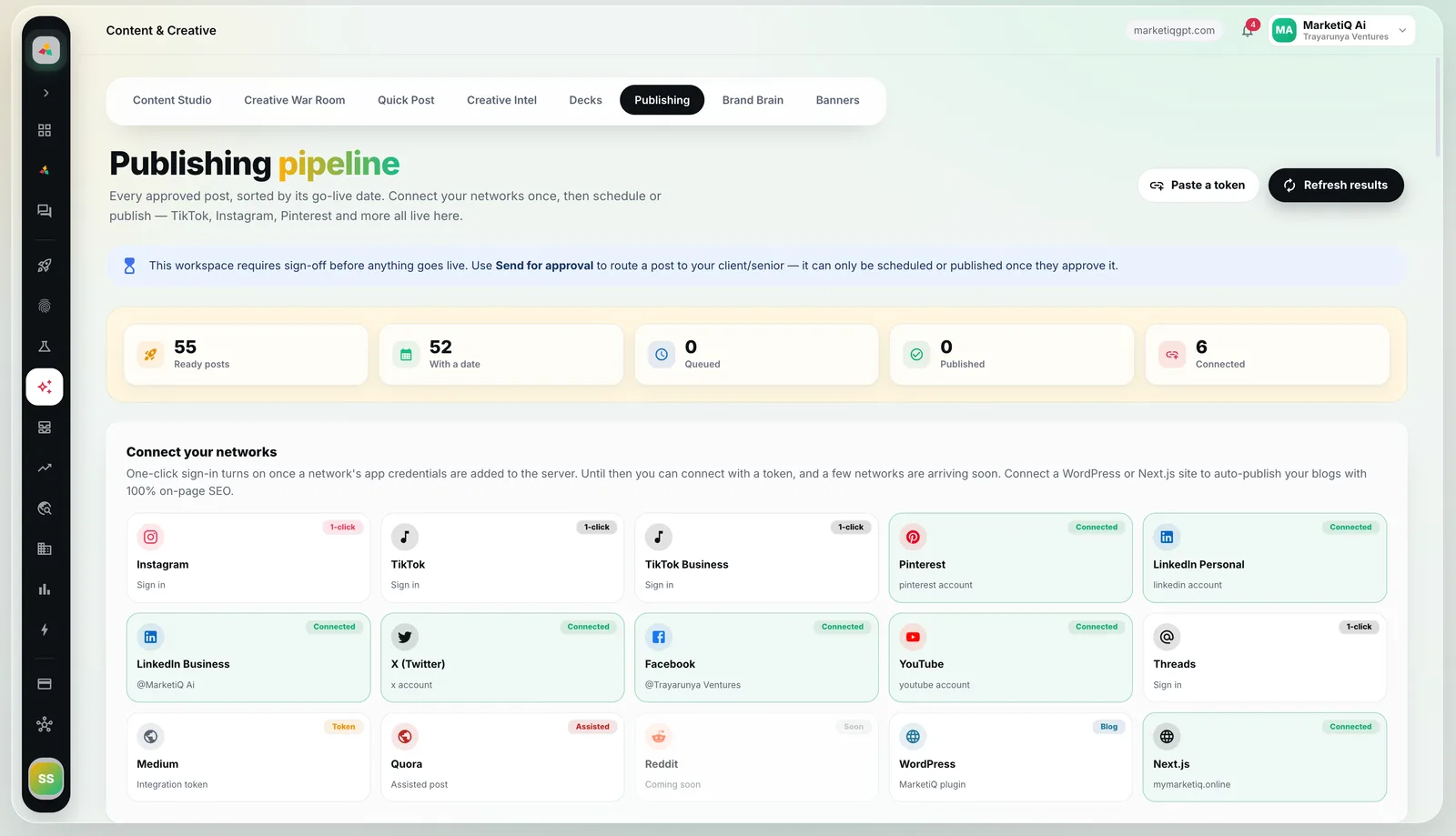
Sign in to each network from the Publishing page. Each platform goes through the approved app that holds its publishing access: MarketiQ’s own for LinkedIn and X, an authorized publishing partner for the rest.
- Piper
Keep connections healthy
Piper keeps every connection signed in, flags the ones that need you and tidies the queue.
- Vera · approvals
Pass the gates
A post leaves only when it is approved and dated, has passed Vera and meets your workspace’s sign-off rule.
- Publisher
Fit each platform
Media is shaped to what each connection accepts — up to ten images on Instagram, carousels as a document on LinkedIn — and X threads post part by part with a checkpoint after each.
- Publisher
Record the outcome
Success needs the platform’s post ID. A missing answer is recorded as unknown and reconciled, never re-sent blindly.
- You
Hand off what APIs can’t do
Medium, Reddit and Google Business Profile posts are prepared for you to publish yourself. Automatic posting to Medium is paused, so a Medium post waits safely in Publishing for you to post it on Medium.
Nothing goes out by surprise.
Approved and dated only
The scheduler sends only posts that are approved and have a date.
Sign-off before go-live
Require client or senior sign-off; a post can then be scheduled or published only after it is approved.
One claim per destination
Each post claims its destination once, so the same post can’t go out twice.
LinkedIn actions stay yours by default
Connection requests, messages and engagement are prepared as drafts for you to send in LinkedIn, unless the desktop app’s opt-in automation is on: device consent, an owner or admin authorization and Autopilot mode.
Per-channel copy
Review and edit each channel’s version of a post before it is scheduled.
Delivery you can audit.
Delivery receipts
Every successful post carries the platform’s ID. Unknown outcomes stay visible until they are reconciled.
X threads with recovery
Threads deliver part by part. If delivery stops midway, the thread is marked incomplete for you to resolve instead of being posted again.
Media fitted per connection
Image counts, video, documents, aspect ratios and formats follow what each connection accepts.
Blogs to your website
Approved blog items publish to WordPress through the MarketiQ SEO plugin or to a Next.js site through the MarketiQ package.
Assisted where APIs stop
Where no official connection exists, Medium, Reddit and Google Business Profile posts are prepared for you to publish yourself; nothing is posted there on your behalf.
Connection health
One inventory of what can publish right now, used by the calendar, the agents and the Publishing page alike.
Channels and how each one publishes.
Live channels publish through the official connection you approve. Assisted channels are prepared for you to publish yourself.
- LinkedIn profileLiveImage, video or document; carousels as a document
- LinkedIn company pageLive
- XLiveOne image; threads part by part
- FacebookLiveOne image
- InstagramLiveUp to 10 images
- PinterestLiveImage required
- YouTubeLiveVideo
- ThreadsLive
- TikTokLiveVideo required
- WordPress blogLiveMarketiQ SEO plugin
- Next.js blogLiveMarketiQ Next.js package
- MediumAssistedPrepared for you to publish yourself
- RedditAssistedPrepared for a person to post
- Google Business ProfileAssistedPublished by a person
- Live
- MarketiQ acts through the official connection you approve.
- Assisted
- MarketiQ prepares the work; a person or your desktop app finishes it.
Which channels can MarketiQ publish to?
Through official connections: LinkedIn profiles and company pages, X, Facebook, Instagram, Pinterest, YouTube, Threads and TikTok, plus blog posts to WordPress or Next.js sites. Medium, Reddit and Google Business Profile posts are prepared for you to publish yourself.
Does MarketiQ automate my LinkedIn account?
Not by default. LinkedIn browser actions are human-operated: MarketiQ researches and drafts, and you perform every final Connect, Send, Like, Comment, InMail and profile-save action yourself in LinkedIn. Sending approved drafts automatically is an opt-in that needs consent on that device after a warning that LinkedIn restricts automation, a recorded owner or admin authorization, and Autopilot mode; it then sends only approved drafts, within each account’s limits and working hours, with a receipt per action.
How do I know a post really went out?
A post counts as published only when the platform returns its post ID. If the answer never comes back, the post is marked unknown and reconciled; it is never re-sent blindly.
Can I require approval before anything is posted?
Yes. Agent-written posts already need Vera’s pass, and you can turn on sign-off so every post must be approved before it can be scheduled or published.
What happens if an X thread fails halfway?
Threads post part by part with a checkpoint after each one. If delivery stops midway, the thread is marked incomplete for you to resolve instead of being posted again from the start.
See it work on your brand.
Book a demo and we will run MarketiQ on your own website, or choose a plan and start your workspace.