From Market Evidence to the Next GTM Decision
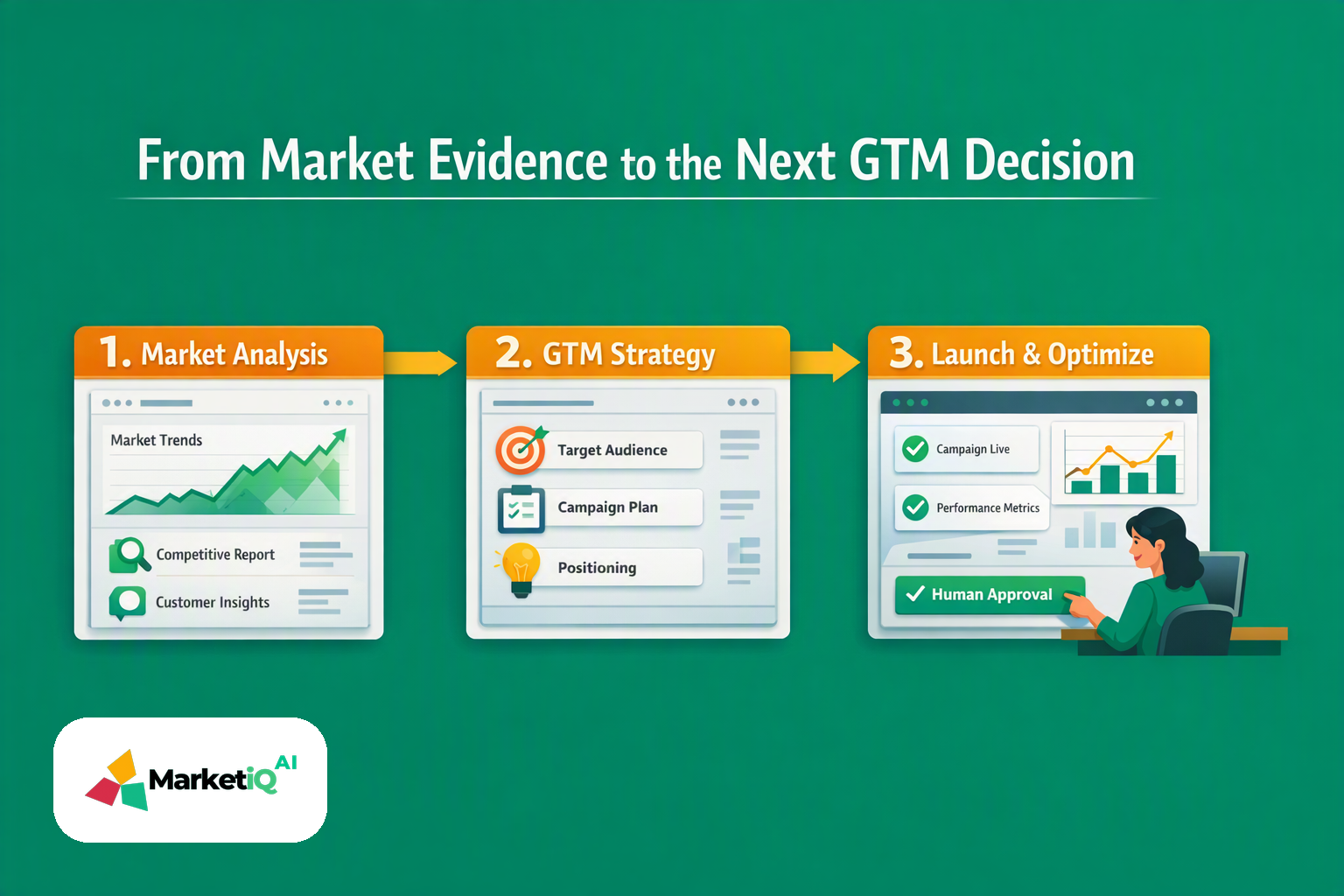
A polished post can still leave a lean B2B SaaS team unable to answer three basic questions: Why was it created, did it ship, and what should happen next?
A lean B2B SaaS team can publish a polished post and still have no reliable answer to three basic questions: Why did we create it? Did it actually ship? What should we do next?
MarketiQ AI is built to answer all three. Its AI CMO and governed go-to-market operating system connect research, strategy, content creation, approval, publishing, delivery reconciliation, reporting and optimization in one traceable workflow.
That changes where marketing automation starts. The useful starting point isn't a draft. It's evidence. The useful endpoint isn't publication. It's a learning decision that improves the next GTM cycle.
This guide shows how to implement that workflow for a lean B2B SaaS team using MarketiQ's operating model.
What AI marketing automation should control
AI marketing automation research, drafting, publishing and reporting only becomes useful when each activity shares the same context.
A disconnected setup might look like this:
- A marketer researches a segment in one tool.
- Positioning is written in a document.
- An AI tool drafts a post without seeing the research.
- Approval happens in Slack or email.
- Publishing is managed in another calendar.
- Performance data arrives later, separated from the original decision.
That workflow produces activity. It doesn't reliably produce learning.
MarketiQ coordinates the stages as an operating loop:
- Research agents build a market map from approved inputs and live signals.
- The AI CMO turns evidence into ICP, positioning, messaging and channel direction.
- Brand Brain context gives composer, designer, director and planner agents the audience, offer, voice and evidence they need.
- Approval gates pause work for human review before activation.
- Publishing agents distribute approved assets.
- Delivery receipts and provider responses record whether work was submitted, accepted, uncertain or failed.
- Reporting connects activity and results back to the decision that created them.
- Optimization feeds the learning into the next loop.
The product is positioned around 37 specialist agents, 46 autonomous loops and 30+ GTM modules. These numbers should be checked against the current product page before publication because product materials can change. The operating principle remains the same: coordinate the work, preserve approval control and make every important state visible.
The MarketiQ workflow, step by step
The outcome you want is a traceable path from one market signal to one approved asset, one confirmed delivery state and one documented next decision.
1. Define the workflow and evidence boundary
Open a new campaign or workflow in MarketiQ. Set the objective to one measurable GTM question, such as: “Which pain point should our next demand-generation sequence test?”
Add the approved inputs:
- ICP and account criteria
- Existing positioning and product documentation
- Customer interview notes or sales-call themes
- Relevant website and campaign performance data
- Search or market signals your team is permitted to use
Label each input as observed evidence, internal hypothesis or approved claim. Do not allow the workflow to treat an unverified assumption as customer proof.
Gotcha: more source material doesn't automatically create better strategy. Remove stale positioning, duplicate files and claims nobody can validate.
2. Have research agents build the market map
Run the research stage. Ask the agents to organize findings by segment, problem, buying trigger, competing alternative and evidence source.
Review the resulting market map. Confirm that each high-priority insight includes a source or an explicit confidence label. Then select the one insight the campaign will test.
For example, a sandbox workflow might identify this hypothesis: funded B2B SaaS teams with small marketing functions lose launch velocity in approval and delivery handoffs, not only in content production.
That is a testable direction. It is stronger than asking an AI tool to “write about marketing efficiency.”
3. Ask the AI CMO to create the strategic brief
Pass the selected insight into the AI CMO stage. Set the output to include:
- Target audience and buying context
- Problem statement
- Positioning angle
- Core message
- Offer or next action
- Recommended channel
- Success metric
- Evidence supporting the recommendation
Review the brief before content production. The AI CMO should turn evidence into a decision, not generate a list of disconnected ideas.
For the example above, the brief could direct MarketiQ to create a LinkedIn post for VP Marketing leaders at funded SaaS companies. The message would focus on handoff visibility, with a CTA to compare the reader's current workflow against an execution reconciliation checklist.
4. Create the asset through the Brand Brain
Open the Brand Brain and verify the active voice, audience, product facts, approved claims and prohibited claims. Then assign the content task to the relevant composer, designer, director or planner agents.
Give the agents the strategic brief, not a blank prompt. Require the draft to include the selected evidence, the intended audience and the next action.
Inspect the output for four things:
- Does it make the same claim as the approved brief?
- Can the reader understand the operational problem quickly?
- Are product capabilities described as capabilities rather than customer results?
- Is the CTA specific enough to create a useful next step?
Brand governance works best when context is configured once and reused. It should not depend on a marketer rewriting the same background into every prompt.
5. Add the approval and permission gate
Assign a human reviewer. Set the workflow to require approval before publishing, and confirm that the connected channel has the correct permission scope.
The reviewer should be able to approve, reject or request changes with a reason. A rejection is useful workflow data. It tells the system which claims, formats or controls need attention before the next cycle.
Do not treat approval as an administrative delay. In a governed system, approval is the boundary between a recommendation and an authorized action.
6. Publish, then reconcile the provider response
After approval, send the asset to the publishing stage. Record the intended channel, scheduled time, asset version and responsible workspace.
Then check the delivery state. A workflow should distinguish between:
- Submitted: the system sent the request.
- Accepted: the provider confirmed it.
- Uncertain: the response requires review.
- Failed: the provider rejected or could not process it.
This is where delivery receipts matter. A calendar marked “published” is not enough if the provider rejected the request or the final asset differed from the approved version.
7. Report the result and choose the next action
Attach performance data to the original campaign decision. Use the reporting stage to compare the result with the success metric defined in the brief.
Then document one next decision:
- Repeat the message with a new audience.
- Change the hook or offer.
- Move the experiment to another channel.
- Stop the test because the evidence did not support continuation.
Performance becomes useful when it changes what the team does next. MarketiQ's optimization loops are designed to feed that learning back into the shared GTM context rather than leaving it in an isolated report.
A practical reconciliation checklist for lean SaaS teams
Before expanding automation, run one workflow through this checklist:
- [ ] The campaign has one defined business question.
- [ ] Research findings link to approved evidence or carry a clear hypothesis label.
- [ ] The AI CMO brief names the audience, message, channel and success metric.
- [ ] The Brand Brain contains current voice, product facts and approval rules.
- [ ] A human reviewer is assigned before activation.
- [ ] Permissions match the requested publishing action.
- [ ] The approved asset version is recorded.
- [ ] Provider status is captured as submitted, accepted, uncertain or failed.
- [ ] Reporting is connected to the original campaign decision.
- [ ] The team records the next action, not only the last result.
If three or more boxes are unclear, your constraint may be workflow reconciliation rather than content volume.
Choosing an AI marketing automation platform
Evaluate the platform against the full workflow, not its drafting demo. Ask the vendor to show:
- How research evidence is stored and cited.
- How strategic recommendations inherit that evidence.
- Where brand rules and permissions are configured.
- What happens when a human rejects an asset.
- How publishing status is reconciled with provider responses.
- How performance data changes the next recommendation.
- Which integrations are available for your current stack, and what remains manual.
For a 2–4 person marketing team, the right test is narrow. Start with one workflow, such as research to approved content to delivery reconciliation. Define acceptance criteria before the walkthrough. Log the time spent on research, handoffs, approvals and reporting. Then compare the existing path with the governed workflow.
AI agents don't replace the marketing team in this model. They extend the team's execution capacity while people retain decision rights, permissions and review. The team still decides what matters, which evidence is credible and which trade-offs are acceptable.
The system handles more of the coordination. It also makes the coordination visible.
Compare your current workflow against the reconciliation checklist, then identify the first handoff that needs evidence, an owner and a confirmed next state. Start there with MarketiQ AI.
This article describes practices and observations; it is not a promise of rankings, deliverability or revenue. Verify cited sources and their dates before making decisions.
Related reading
- 1The GTM Loop an AI Marketing Copilot Should CloseLinked from this article
- 2AI GTM Platform Selection GuideLinked from this article
- 3Best Autonomous GTM OS for Lean B2B StartupsLinked from this article